
Aurora’s Custom Content Sections: Ads, Banners, and Newsletter Forms
 By Daniel Ekay
•
May 18, 2026
•
By Daniel Ekay
•
May 18, 2026
•
Aurora includes five areas where you can inject custom HTML or shortcodes directly into your site without editing theme files. Four sit between your homepage layout post blocks; one appears globally just above the footer on every page.
Homepage Content Sections
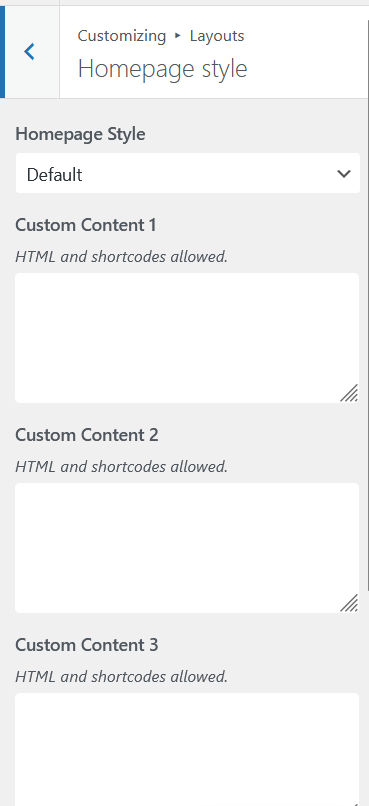
Each homepage layout includes four custom content fields positioned between the post blocks. Go to Appearance → Customize → Layouts → Homepage Style to find them:
- Custom Content 1: appears above the first post block
- Custom Content 2: appears between post blocks
- Custom Content 3: appears between post blocks
- Custom Content 4: appears below the last post block
The homepage sections only appear on the homepage. For a sitewide content area above the footer, use the Newsletter field in General Settings. It appears on every page.
Each field accepts raw HTML and shortcodes. Leave a field empty and it outputs nothing. No wrapper, no empty space.
Common uses: ad units, affiliate banners, email opt-in forms, promotional announcements, or any block of HTML you want embedded in the page flow.
Global Newsletter / Footer Section
A separate field under General Settings outputs content just above the footer on every page of your site, not just the homepage. Go to Appearance → Customize → General Settings and find the Newsletter / Custom HTML field.
This field also accepts HTML and shortcodes. It is designed for newsletter signup forms but works for any full-width content you want sitewide: a subscription call-to-action, a persistent banner, or a global announcement strip.
Using Shortcodes
Any plugin that outputs a shortcode works here: Fluent Forms, WPForms, Mailchimp for WordPress, and similar. Paste the shortcode directly into the field and it will render on the front end.
Tips
- Wrap your HTML in a
<div>with a custom class if you want to style it separately with Additional CSS. - The homepage sections only appear on the homepage. The footer section appears on every page.
- Fields that are left blank add no markup to the page. There is no performance cost to leaving them empty.