

Aurora’s free trial gives you full access to the theme for 30 days with no credit card required. This guide explains what is included, what is not, and how to get started.
What the Trial Includes
- All layout templates included with Aurora: all 8 headers, 5 homepages, 13 archives, 10 single post layouts, 5 footers, 4 author page layouts, 3 search layouts, and 5 404 page layouts
- Full Customizer access: colors, typography, socials, menus, and all settings
- All performance features: conditional CSS loading, local Font Awesome, Google Fonts preconnect
- WooCommerce, Elementor, Gutenberg, and RTL compatibility
- Free migration and setup assistance. Reach out at aurora@lystingz.com and we will configure the theme for you
What the Trial Does Not Include
- Nova plugin templates: Nova is a separate template extension and is not part of the trial. Nova only works with the Aurora Pro theme, not the trial version
- A permanent license key: the trial runs for 30 days from activation, after which layouts revert to defaults unless you purchase
How to Start the Trial
- Go to aurora.lystingz.com and click Try Aurora Free.
- Complete the free checkout. No payment information is required.
- You will receive a download link and a trial activation key by email.
- Install Aurora on your WordPress site as you would any theme ZIP file. See How to Install Aurora from a ZIP File.
- Activate the theme with your key and your trial activates automatically.
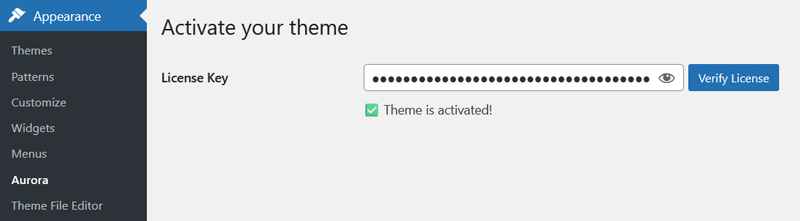
Need help setting up? After installing, follow the New User Checklist to get your site configured quickly.
How Long Does the Trial Last?
The trial runs for 30 days from the date of first activation on your site. There is no automatic charge at the end of the trial period.
What Happens When the Trial Ends
When the 30-day period expires, Aurora remains installed but all pages revert to the Default layout. Your content, posts, and pages are not affected. Only the presentation changes. Your Customizer settings are preserved and will take effect again if you activate a paid license.
Upgrading from Trial to Pro
If you decide to purchase Aurora during or after the trial, you will need to install the pro theme file before activating your license. Your Customizer settings (layouts, colors, fonts, and menus) carry over automatically when you activate the pro theme, so nothing needs to be reconfigured.
See Upgrading from Aurora Trial to Aurora Pro for the full step-by-step process.